|
||||
DCC for Beginners If you are new to DCC and are wondering what it is all about, this section is for you. It is aimed towards someone that knows nothing about DCC and is intended to answer some basic questions you may have about DCC. Many of the answers below will direct you to other sections of this website for additional information. We think you will find the question and answer format of this webpage helpful. Just look for your question. Many thanks to Don Vollrath and Marcus Ammann for answering many of the questions below. Introduction Modern electronic gadgets are truly complex in the manner in which they work. Practically everything nowadays is operated by a computer of some sort. But using them does not have to be complex. That's a process of us fundamentally understanding enough about how it works from the outside, so that we can get it to perform the intended tasks. However, connecting up several gadgets and getting them to work together can be a problem. “Plug & Play” is an attractive buzzword, but often we can’t even tell if the separate components are really designed to work together. For that we need to know much more about how each device is supposed to operate, and how those characteristics may affect the interface to and operation of other equipment. The education process leaves much to be desired as available literature or published information is either too simplified or too complex for the intended audience. The viewpoint of the assistance may even be slanted toward product sales rather than universal usefulness. This leads to customer / user frustration rather than satisfaction. DCC Vs DC for model train control is one of those topics. There are some big differences between the methods, but many of the fundamentals are still the same. The small details are the cause of all the discussion, confusion and problems for some users.
Best Practices for Beginners The contents of this website recommend "best practices" for everyone; especially beginners. This is "Keeping It Simple, Stupid." Following the advice in this website gives you the best chance of having a successful railroad for years to come. Many people write asking for permission to violate the advice in this website due to age, cost, time, and wanting to keep it even simpler. None of this allows anyone to violate the laws of physics and sound engineering. If you don't have the inclination to do it right the first time, save your money because it will cost you even more to redo it later. So if you are looking for a blessing to cheat, there are other chat groups that might give you what you are looking for. In a nutshell, what is DCC? DCC stands for Digital Command Control. It is a system where digital commands are sent to the locomotives through the rails. The layouts of yesteryear used block control. Each required its own power pack and a complex control panel to keep each locomotive electrically separate from each other. DCC allows independent control of multiple locomotives within the same block. DCC provides for digital control of turnouts and signaling as well. Other features include a multitude of sounds, block detection, momentum control, and the ability to lash locomotives together in a combined consist. DCC is an NMRA standard. This means locomotives equipped with decoders from various manufacturers may be used with any DCC system! Should I Read the DCC Manuals?
What are the basic components of DCC systems? In short, what do I need to buy to get started? A DCC system consists of five basic components. Most starter sets come with everything you need except a decoder. (Some may require you to buy your own power supply.) Command Station – The heart or brains of DCC. The Command Station is a dedicated computer that communicates with all other parts of the DCC system. Selecting the brand and model of Command Station is key to selecting the type of Throttle controls as well as feature expandability of the system. Throttle or Cab – The man-machine interface between You, the engineer, and the Command Station controlling the train. Various Throttle equipment styles exist. Some systems use a plug-in, walk-around Throttle, with the possibility that more than one can be used at the same time. Some systems have Throttles built into the Command Station. Each brand of DCC system requires their own brand of Throttle or Engineer’s Cab, and their specific type of Throttle to Command Station wiring interface. You cannot easily intermix brands here.
Power Supply – An AC transformer or DC power source for the Command Station and track power Booster. The Power Supply is NOT INCLUDED with many DCC equipment systems and must be purchased separately. An additional Power Supply is usually required with each additional Booster. Loco Decoder – An electronic receiver inside the loco out on the track. The Decoder receives communications from the Command Station and controls the loco motor and lighting effects. Some Decoders also add locomotive sounds to operation. Every DCC controlled locomotive must have its own decoder. But any brand of Loco decoder should work with any brand of DCC Command Station / Throttle equipment. Many home layouts are easily accommodated with starter systems that include the above basic items, plus a few additional Loco Decoders. [But be sure to ask about the Power Supply.] However, as your model railroad grows you may want more DCC equipment, including: additional Throttles for multiple users (same brand); remote Plug-In panels for walk-around Throttles; Accessory Decoders for DCC operation of track switches (turnouts); Auto-Reversing track controllers; more Power Supplies & Boosters; Electronic Circuit Breakers for separation of track circuits into multiple power districts; or even Radio equipped Throttle Adapters.
How Many Boosters Do I Need to Buy? How many boosters you need has little to do with how big your layout is. Rather, it depends on how many locmotives you will be running. A 5A booster can power six to eight HO locomotives. Will you be hosting operating sessions with several operators? Or will you be running just a few locomotives by yourself? If you have a lot of sound locomotives all making noise at the same time in your yard, you may need a booster just for your yard. Be aware that most sound locomotives can be silenced when not pulling a train. If you do have a large layout (greater than 30 feet in any direction from your booster), but will only have a booster or two, be sure to twist your bus and install RC filters (snubbers) at the bus ends. Don't put RC filters on your booster. If you think you may need more boosters in the future, allow for them now. In the future, separate existing buses and add your boosters. There is no harm in having to add boosters later if you don't have enough now.

Note that a computer is NOT required. Computers are only needed for signaling or a few of the do-it-yourself DCC systems. NONE of the commercial systems require a computer and therefore, no programming is required. The only thing you need to do is configure the address of your locomotives.
Suggestion: Getting Started the Easy Way Some of you have been out of model railroading for a number of years. Maybe you were raising children. You are finding that there are significant changes that have occurred since the last time you ran a train. These are not just changes, they are improvements! You will find that you can run trains like you never have before. They have sound now and some smoke. The detail is better and they are better running. Welcome to the new and improved world of DCC trains! Still, you are a little overwhelmed. We're here to help you over the hump. Be sure to read this entire section of "DCC for Beginners" topics. I wrote it for you! First, to avoid having to learn about electronics, buy a starter set that has everything you need. That way you don't have to learn about the various components of a DCC system. NCE in particular provides a great way to get started and expand. The Power Cab and Pro Cab throttles are essentially the same. Get started with the Power Cab. When ready, upgrade to a Pro Cab system and keep your throttle. Just be aware that some starter sets need a transformer. Your dealer will be able to tell you if you need a transformer and sell you one. Transformers today come complete in a housing with a plug. Just attach the two wires from the transformer to the input terminals on your starter set and you are ready to go. Each manufacturer of the DCC booster and/or command station has their own preferences as to the type, AC or DC, and capacity in volts and amperes that should be used with their equipment. It is important to follow their guidelines for best results and proper protection of their equipment. New equipment types are likely to require a regulated DC power supply, correctly sized for the capacity of the booster rather than a transformer. See the section on selecting a system. Unless money is really tight for you, buy a starter set that has all the capability you need. There are some introductory systems that are expandable. Get one of them if you can't afford a full-featured system to start. Second, either buy a locomotive with DCC already in it, or buy one that is DCC-ready and then add a drop in docoder. This will get you into DCC without having to be a wiring and electronics expert. Again, your dealer will be able to recommend a locomotive and the right decoder to match your budget. Modern locomotives run much better than your old locomotive. For more on this, ready the section on converting your old DC locomotives and why it might be a good idea to avoid doing so. Third, wire up some track. Make sure everything works. If you have any questions, we have a lot of knowledgeable people on the Wiring for DCC Q&A Forum. You can upload drawings of your layout (You have to upload the files separately. Yahoo chat groups doesn't allow attachments) and people can offer you advice. Read the section on track wiring for specific topics that you will need. You will also want to read the section on turnouts. Be sure to look over this whole website. Make use of the site index/map to find a specific topic. Welcome to the world of DCC model railroading!
What Should I Do With All My DC Locomotives? Those that switch to DCC from a traditional DC layout and have a fleet of DC locomotives often contemplate a layout that combines DC and DCC. The fear is that you can't afford to convert all those locomotives. Don't worry about it. Go ahead and jump into DCC! There are some good reasons. I will start with the bad news. Mixing DC and DCC can be fatal to your DCC electronics. If a locomotive crosses a gap between a segment on DCC and another on DC, it could fry things. If you have a crossing that has one side DC and the other DCC and a locomotive derails on it, smoke could be the result! For more on this topic, see the section on using DC and DCC on the same layout. Even if coming up with $20 for a decoder is a problem for you and the total cost seems frightening, relax. You will probably be more pressed for time to install decoders rather than paying for them. Converting old locomotives can take a tremendous amount of time; especially if the locomotive has a metal frame and the motor and power pick-ups are not isolated from the frame. Most old locomotives are like this. If you have a brass locomotive, you can pretty much guarantee that this is the case. Also, old locomotives probably have very few wheels picking up power. So besides isolating the motor, you may find yourself having to add power pickups. Finally, the motors in old locomotives were not usually of high quality. So you may find yourself needing to replace the motor, too. I still have a large fleet of old DC locomotives. A few I will convert to DCC if I ever find the time. The rest will sit on the shelf making like a museum piece. Or I will sell them on eBay to someone who can't pass up a great deal and has loads of time to convert them to DCC. Hint If you see a deal on eBay, be sure to inquire if it is DCC ready. Otherwise, that deal may end up costing you a lot of time and money in the end. Save your pennies and buy a few modern, quality locomotives that run well. Even if they don't come with a DCC decoder, DCC ready locomotives won't take much work. They also look much better than those of yesteryear. You will be much happier. Don Vollrath's thoughts: Conversion of old locos is not necessarily as easy or as rewarding as you might think. It can be a lot of fiddling around, time consuming and somewhat disappointing. But once you take the plunge and buy a decent RTR (ready-to-run) loco, especially with sound, there is instant gratification. Like Allan, I've got plenty of what used to be favorite DC locos yet to be converted. The older tooling can look toy-like compared to latest models. The open style motors draw too much current. They seemingly "ran great" on DC... but not when compared to today's standards. They sit on unpowered stall tracks or are stored away in boxes alongside the other numerous yet-to-be-built kits. [I've got a pre-DCC Atlas GP40 on my workbench right now and am struggling in my 'spare time' with how to mount the Tsunami decoder and speaker.] One good option for the novice is to have a knowledgeable local club member or friend help with the first couple of decoder installs. But yet there is a big jump from the $69 RTR DC GPxx, or a $100 around-the-tree train set, to the multi-hundred dollars it takes to get started in DCC. Selling old stuff at a swap meet isn't very productive as the guys that go there are not that interested in old treasures. One option I have taken is to simply give several old DC locos with a power pack and track to interested neighbor kids. Mark Gurries' thoughts: Modern DCC ready locomotives have state of the art better detail, paint jobs, mechanical design, electrical pickup and lighting systems. DCC versions often include sound giving you a whole new dimension to your layout enjoyment. If one combines the locomotive budget with the DCC decoder budget, often you will get a much more rewarding experience the day you buy it and place it on the layout the same day and running it. This is your best option if you find yourself electrically challenged. If one cannot afford a locomotive upgrade path and you want to convert some old locomotives to DCC, start by only converting your two favorite locomotives. Do not attempt to convert them all at once. Once you have done these, you have a better idea what the best thing might be going forward with respect to the rest of the old fleet.
Small Layouts What is a small layout and what should you do? For the purposes of this discussion, a small layout is one that is operated by yourself and at most a couple of your understanding friends. You might only operate one or a few locomotives or several locomotives in a consist (lash-up or multiple units). A small layout may only occupy a small bedroom. A layout this small may do just fine with one booster or a system that has an integrated command station and booster. Larger layouts need block isolation, circuit breakers, and multiple boosters because a short due to a derailed locomotive or locomotive crossing a turnout frog could shut down the entire railroad. Larger layouts have many operators and a lot of people could get annoyed by frequent layout shut downs. The bus length from your booster to it's end is likely to be less than 30 feet (10m). If this is the case, you do not need to worry about twisting your bus wires and you do not need snubbers at ends of your bus wires. You don't need to break your small layout down into blocks, but I suggest that you do in some way. This will ease trouble shooting should a problem develop. The simplest way to break your layout into blocks is to use insulating joiners and then connector your sub-buses to a terminal strips where you can disconnect them if need be. The next cheapest way to isolate blocks is to use bulbs. See the section on bulbs in the track webpage. You might want to use DCC controlled turnout machines. You don't need to. It is simply your choice. Should you make this choice and you use a single booster to control your turnouts as well as run your trains, then you should definitely use a DCC electronic circuit breaker to isolate your track from your turnout control sub-bus. This is so a short on your track - maybe due to moving points of a turnout - do not stop to movement of the points and clear the short. Small layout owners are often tempted to buy a very basic system. Inevitably, they want more features than these systems offer. If you want a low-cost, starter system, I suggest you move up one level to a starter system that is expandable.
How is it supposed to work? For standard DC controls, the ‘throttle’ puts variable voltage power on the track. Loco motors and headlights connect directly to the track. The speed (and intensity of the lights) will vary by simply changing the voltage applied to the track. Electrical current (amperes) drawn by the loco flows through the track rails and feeder wires. More than one loco can be operated on the same rails when coupling them together (mu’ed) but since they all receive power through the same throttle, they will all run at the same speed (when geared the same). If you want to operate more than one train independently of another, you must break up your layout into multiple control blocks (power districts) where each has its own operator and throttle. It is unlikely that the feeder wires and/or rails will need to carry more than 1 or 2 amps (HO scale) at any given time. Furthermore, since an operator is watching the trains and controlling the throttle, he often adjusts the track voltage setting to get to the desired running speed. This unconsciously compensates for all kinds of electrical sins that causes problems with DCC. (Poor electrical connections, resistance in the track rails and feeder wires, power supply sag with load, etc. etc.) DCC puts ‘fixed’ electrical power on the track. There is a special receiver (the decoder) inside each loco that receives track power AND listens to commands sent out over the rails from a master control station (command station). These gadgets are actually small dedicated computers and electronic hardware. The DCC track voltage is an amplified computer to computer serial communication link bit stream, manipulated by the control station and beefed up by the ‘booster’ to have enough power to operate motors and lights out at the train. The whole reason for DCC is to allow multiple locos to operate independently on the same track, without having to divide up the layout into complicated electrical control blocks. The DCC communication scheme allows this to happen. Power for operating the locos still must come from the track, but all of the track can now be electrified in unison. This does simplify track wiring on most layouts. However, power from the DCC booster must be able to reach and operate all the moving locos simultaneously. This means that track wiring for DCC may need to be more robust than that for DC.
What’s so different about the wiring? Since all loco power must come from the track and more
than one loco may be running, DCC boosters (and their power supplies)
are designed to have current ratings of 5 to 10 amperes (amps). Most
traditional DC power packs are meant to run only one train at a time
and are therefore designed to supply only 1 or 2 amps. But since DCC
locos and their ampere demand may be located anywhere on the layout,
wiring to the track for DCC should be designed to handle a higher number
of amps. There are two primary reasons for this. For all locos to operate
independently, the voltage signal on the track should remain fairly
constant in magnitude and not subject to sagging as a train moves around
the layout. This becomes important specifically with larger club layouts
when a second, third or fourth train also drawing 1 or 2 amps may be
in the same vicinity. Voltage sag caused by electrical resistance of
the track or track feeder wiring should be avoided by having more track
feeder wire connections scattered about the layout and using heavier
gage wire than that required for simple DC systems. A second reason
for a more robust wiring system is to ensure that the over current protective
devices built into the DCC booster will indeed operate correctly. This
is necessary to protect your model railroad equipment from damage caused
by an accidental electrical problem. With simple DC the relatively puny
power packs are limited to 12 volts times 2 amps or about 24 watts of
power. Since you are probably operating only one train at a time, it
is relatively easy to observe that the train stops when a derailment
causes an electrical problem, and turn off the throttle while fixing
it. With DCC, a booster can supply 12 volts at 5, 8 or even 10 amps
into a track short circuit without becoming overloaded. That represents
perhaps 60 or more continuous watts being available to cause spot heating
at the source of an electrical problem. This can easily burn out wires
inside the locomotive decoder, pit metal wheels or melt plastic track
ties. The cure is to make sure that a short circuit at the track, regardless
of where it occurs, can draw enough instantaneous current to cause the
booster to shut down. Designing the electrical distribution system for
low resistance is about the only way to resolve either of the above
issues. This generally means larger wire, solid electrical connections,
soldered rail joiners and more track feeder drops to avoid the inherent
electrical resistance of the rails. The much discussed DCC bus distribution
system helps to do just that. A practical criteria is to ensure that
a metal coin placed on the rails will always cause track power to be
disconnected, anywhere and everywhere on the layout. One of the additional
techniques used on club sized layouts to avoid the nuisance of having
the whole layout shut down when only one operator has a derailment is
to break up the track into smaller “power districts” each
protected by an electronic circuit breaker. DCC auto-reversers are also
available to quickly detect a momentary short circuit and re-connect
track polarity to a reversing track section. For either of these to
be effective the protective circuit breaker must trip on an overload,
or the auto-reverser must re-orient track polarity, faster than the
main layout booster will trip. Again, a low resistance track circuit
helps allow that to happen.
Another complication is that the DCC voltage on the rails is AC rather than DC. However, this is not quite the same as the smooth cycle constant low frequency 50/60 Hz AC available at the local utility wall outlet. The command station to loco communication scheme relies on relatively fast reversals of track voltage to be detected at the loco decoder. It is the timing of these transitions that form the serial bit stream of computer to computer communications. If the decoder in the loco cannot correctly read the commands, DCC does not work. This means that short power interruptions to the loco caused by poor electrical connections or dirty track previously ignored by DC throttle systems can cause major havoc with DCC. Another subtle difference becomes important on larger layouts. As power wiring between booster and track becomes longer than 30-40 feet, the inductance of track power wiring can become more significant than the electrical resistance. A track voltage loss and voltage ‘ringing’ occurs as the DCC signaling scheme attempts to quickly reverse track voltage. This causes a voltage drop at the track and possible loss of DCC signaling even though the measured DC resistance of the wiring may be low. Using a larger wire gage on the DCC bus or track feeders does not necessarily help this problem. Twisting the DCC bus wires to lower the inductance, or moving the booster to utilize shorter wiring runs, or providing another booster closer to the track will help. For more information, see the section on track wiring.
Do I need blocks with DCC? While you don’t need any more blocks than this, if you have a layout that will be operated by more than one person or a layout bigger than might fit on a sheet of plywood, it is recommended that you install additional blocks to ease troubleshooting. You don’t need as many as you had with a traditional DC-powered layout, but without at least a few blocks, you will not know where to start if you have a problem. Furthermore, if you have a short on a DCC layout, the whole layout may shut down without blocks. For more on the topic of blocks, see the section on track wiring.
Are DCC system components interchangeable? Some boosters are interchangeable with command stations of a different manufacturer. I’m not sure why you would want to do this. If you think you will be saving money, just keep in mind if it doesn’t work, you might have trouble getting help from the manufacturer of either system or others on the Internet. To ensure you don’t have any problems, you should stick with boosters made by the same manufacturer as your command station. In general, throttles are not interchangeable with command stations manufactured by someone else. Note: Some systems, especially the starter systems, may have a throttle, command station, and even a booster integrated into one unit.
How do I select a DCC system? It is impossible to recommend a DCC system. You have to pick the system that is right for you. Here are some suggestions on how to do that. Dale Gloer suggests: In my opinion the "best" system to buy is one that has a good, helpful dealer near you. A second criteria is to chose a system that your modeling friends use. After the above criteria, your choice can be based on functionality and price. Dale. Mark Gurries suggests: The best way to choose which system to buy, of course, is to try them all first by going to a friend's house, hobby shop, or RR club. You may be able to simplify the list if you have a strict budget, but trying some of the higher end systems can be educational. Look at the throttle and see how it feels in your hand, Select and run a train, make and break a consist and program a locomotive on the programming track. Ask yourself, is this an easy thing for me to remember or easy to find in the manual in case you had to do a quick look. Check out the manuals too. Borrow one [or download from manufacturer’s website] and take it home to read and see if it all makes sense to you when you get back and try the system. Be honest about your abilities. For example, if you cannot set a digital clock, you may want to lean towards a simpler system with fewer features. Another issue is learning curve. If you are going to run your layout once a month, a system that forces you to re-read the manual to use it is not going to be a very enjoyable experience. Another factor, as Dale indicated, is to look at what your friends use in term of support. But if you think you're going to have to bug your friends every time you want to play with YOUR layout at home, then that system may not be a good system for you. The best DCC system is the one that works best for you. And finally, my thoughts: You may want to buy the same system as your friends; especially if you will have operating sessions. This will allow you to use each other’s throttles. When selecting a system, especially a starter system, make sure it has the features you want. If you want sound, make sure the system supports functions that will trigger your sounds. If you want to use your locomotive number as its address, make sure you get a system that supports long addressing. Does it support consisting? Can it control turnouts? Will the system be able to grow with your needs or is it not expandable? Check eBay and see how much you will be able to sell your starter system if you outgrow it. Ask Dale or Mark a question on the Wiring for DCC Q&A Forum.
Can I use DCC on my existing layout? If you have an existing layout, you may be able to use it as is. Most of the advice given in this website is aimed at giving you trouble-free operation. Minor problems that you tolerate with DC may give you major problems with DCC. This is for two reasons. One, if you have multiple operators, a minor problem may affect all operators simultaneously giving you major headaches. This might happen when your booster shuts down. The second reason is that DCC systems are capable of putting much more current onto your track. This can cause melted plastic parts and pitting of your track and wheels from arcing. The most important thing you need to do to determine if you can use your existing wiring is to hook up your booster and give your entire layout the "short test." See the 'How to Know If Your Wiring is Adequate - The "Quarter Test"'for more on this test. When running this test, flip all your turnouts. All the manufacturers insist that your layout be able to pass this test. Being able to pass this test will avoid melting and arcing. For more information, read the section, "What is so different about the wiring?" If you need to rewire your layout, see the entire section on Track Wiring.
Do An Incremental Installation It doesn't matter how smart you are or how much experience you have, this advice is for you: do an incremental installation. For some reason, human nature or otherwise, people don't want to do this. Whether you are installing a decoder or installing track wiring, do an incremental installation. Yes, even though I have been doing this a long time and I don't make many instakes, I still do an incremental installation. Why? Becuase if you do make a mistake, and you probably will, you only have to back up a little bit. Yet, people would rather do a lot of installation and then test. After things don't work, panic sets in. (Note: It is never too late to panic.) You panic because you have soooo much ground to cover. Nothing works. You can't acqire a locomotive. You can't afford to fly me to your home and pay me. Now is a great time to panic. Your only choice is to start cutting wires. So install just a little and test. Install a little and test. If you are reading this web page and have never wired a layout or installed a decoder, install a little and test. If you have been doing this for 20 years, install a little and test. If you are wiring your trackwork, I also recommend you use a buzzer. If you make a mistake, you will know it right away. You won't need to back up. See the section on track wiring for the buzzer.
Do I have to solder all my joiners? It is not recommended that you solder all your joiners together. For more on what to solder, see the section on track wiring covering this topic.
Flux This is very simple. Just follow these two rules. Acid flux: NEVER use acid flux on your model railroad electronics or track wiring. Acid flux will corrode your electronics and wiring. There is no need to want to use acid flux. There are other less aggressive fluxes that are well suited to electronics and wiring. For more on liquid flux, see the section on soldering with liquid flux. No flux: ALWAYS use flux; either solid core rosin flux or liquid flux. Not using flux could result in melted ties, wiring, or damaged electronics due to excessive heat application. For more on liquid flux, see the section on soldering with liquid flux. For more on soldering, see the section on soldering.
Can Conventional Circuit Breakers and Fuses be Used with DCC? contributed by Don Vollrath There have been repeated questions regarding the use of less expensive conventional fuses and circuit breakers between DCC boosters and track. Here is an explanation as to why these will not work. The purpose of DCC electronic circuit breakers is twofold:
Part of the problem here is that the DCC boosters we use
do have their own limited current output…. And internal over current
trip mechanism. This means that it will take a very long time (maybe
never) to cause a thermal or magnetic type CB or fuse to actually trip.
The booster will always trip first by sensing current just beyond its
normal output rating. So… no, an ordinary circuit breaker or fuse
intended to trip on high peak overload currents in order to prevent
fires is not likely to perform nearly as well as the electronic versions
designed specifically for DCC. Note: Above, Don wrote about circuit breakers going between boosters and the track. This is not to be confused with the use of conventional fuses and circuit breakers between your power supplies and your wall power. They are highly recommended for this application to protect against severe overloads or equipment failure to avoid potential fires. - Allan
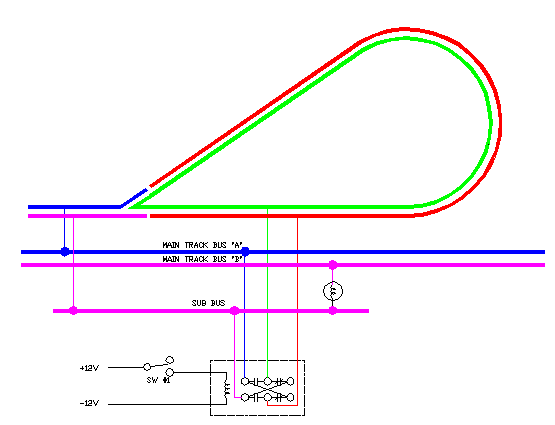
Reversing Basics: If you have a wye, a balloon track, a turntable, a dogbone with a single or double crossover, an oval with a diagonal connection from side-to-side, or a track plan that loops back on itself, you will have a short circuit due to a reversing section. In order to deal with this situation, you will need some way to avoid the short circuit. This is accomplished by designating a section of track as the reversing section and you will usually need an automatic reverse section controller or simply call it a reverser. In addition to needing a reverser, you will need to use insulated joiners at both ends of your reversing section. If you have a turntable, you will also need a reverser. If you have a balloon track, you may be able to use a relay which is less expensive than a reverser. Whether you use a relay or a reverser, they are pretty simple to hook up. Usually two wires feed the reverser from the mainline or non-reversing track. The reverser then feeds the reversing section by two wires.
Example of a balloon track using a relay to accomplish the reversing function. You don't have to use a relay — you can always use a reverser. For much more on reversing and a lot of examples, see the reversing section in the section on track wiring.
What happens to a train when the power reverses in an automatic reversing section? The train continues to proceed in the direction it was heading! This is one of the great things about DCC. Train direction is always independent of the polarity of the power. When you command a train to go forward, it goes forward no matter what.
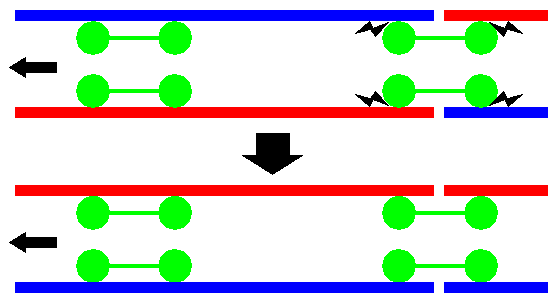
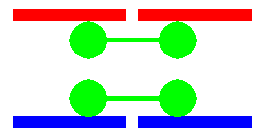
Let me guess, you next question is, if the train doesn’t care about track polarity, why do we even need to worry about reversing sections? Look at the next two diagrams.
With reverse section control, you make sure red goes to red and blue goes to blue. Automatic reverse section control detects the shorted condition above. Rather that shutting down your booster, it automatically reverses the track’s polarity to get rid of the short so that red goes to read and blue goes to blue. Pretty nifty, huh? One last question. What happens when two trains enter a reversing section at the same time? This is bad, too. The diagram below shows two trains entering a reverse section. The train on the left has no short. The train on right causes a short and the automatic reverse section controller flips the polarity of the track. But wait, doing this now causes a short with the train on the left. No matter which way the automatic reverse section sets the track polarity a short occurs. When this happens, your booster (or electronic circuit breaker if you are using one) shuts down your track power. Lesson: You never want two trains entering a reverse section simultaneously at opposite ends.
For more on how to wire up reversing sections, go to this website’s section on track.
Programming Tracks Programming tracks can either be installed on your work bench or on your layout. If you install yours on your layout, you will need to take a precaution to avoid blowing up your programmer. For more on this topic, go to this website's section on track.
Using both DC and DCC on the same layout Some modelers, who are just getting into DCC, think that the way to enter the world of DCC slowly is to equip their layout to run DCC and DC at the same time. Others in a club that is just going DCC want to be able to run DCC and DC at the same time for the modelers who cannot afford the $15 for a decoder. Few topics have elicited such a lively discussion on the Wiring For DCC Q&A Forum as this one. The overwhelming advice is: Don't do it! For one thing, why waste the incredible amount of time it will take to wire a layout for both DCC and DC. Why not use that time outfitting your locos with decoders? Then there is the cost. Why waste your money on all the switches and a large, isle clogging, control panel when you could put that money toward purchasing decoders for your locomotives? The real problem is that layouts running both DCC and DC at the same time have been known to blow decoders and perhaps boosters - also known as "letting the smoke out." This can get expensive. The problem is that sometimes the DC and DCC will add together. This exceeds the rating of the decoder and sends it to decoder heaven - also known as the nearby trashcan. Some modelers will tell you that they have combined DC and DCC with no problems. Others will tell you horror stories. Why waste the time and money of building a combined layout to find out if you will be one of the lucky few or the unfortunate many? Some modelers will tell you of elaborate schemes to ensure that they will not ever switch a train from a track with DC to a track with DCC. Sooner or later, someone will make a mistake and smoke a locomotive. I have not heard of any scheme that was fool proof. Fools can be very ingenious! If you want to run DCC and DC on the same layout, the only sure fire way to do so is make tracks that are completely isolated and can never be mixed. If you have an existing layout, perhaps a modular layout with multiple mainlines, that has turnouts that cross between them, nail the turnouts aligned for the mainline so that they cannot be switched. Cut the wires on the control panel that would flip the turnout. Most older locos don't run well enough to use on DCC. Poor running locos detract from the great DCC experience. If you really consider converting your good running locos to DCC, how many do you have? I have a lot of older locomotives that are waiting for decoders that need work — new can motors and better power pick-ups. They will probably end up on eBay instead. Wiring Considerations for Dogbones with (Double) Crossovers Perhaps the single most popular track plan is a dogbone with double crossover. You should be aware that such a track plan creates the need for one or more reversing sections. This is no big deal. Your layout simply must be wired accordingly. For diagrams and discussion on wiring up a dogbone with a double crossover, go to: http://www.wiringfordcc.com/track_2.htm#a43 For diagram and discussion on wiring a double crossover, go to: http://www.wiringfordcc.com/switches.htm#a22
Signaling When people think about getting into DCC, they also think about implementing signaling. I don't want to burst your bubble, but signaling is involved and costly. If you want it, do it. But if wiring or programming isn't your thing, get some help from someone who is. Signaling will easily double your investment in DCC. You don't have to have block detection to have signaling. You can just have your dispatcher control your signals. Most people want their signals to change as a train progresses down the track. For this, you will need block detection. To a limited extent, IR sensors can be used. Should you give up on signaling? You don't need to. You can implement signaling at a later date. There are low cost and easy things you can do now. At a minium, you will want to block your new railroad for signaling. On top of your layout, you may need three electrical sections per signaling block. Underneath your layout, you will wire each block separately and allow for a block detector circuit to be added at a future date. How you do this depends on the block detector circuit you select. Moving up the cost ladder, you can add that block detector circuit now while you are wiring your layout. In order for block detection to work, your train needs to draw current. Locomotives and lighted passenger cars do this. To detect the back end of your train, you will either need a lighted caboose or resistors added to the axles on your caboose. If you don't have a caboose or want to detect every car, you will need to add resistors to them as well. For more on block detection and adding resistors, see the section on block detection. As you might surmise, you can add resistors to your axles whenever you have the time and inclination. Beyond this, get your railroad up and running. Get comfortable with DCC and wiring. Then go for signaling when you are ready and can afford it. For more on signaling, see the section on Signaling.
Can I control my turnouts with DCC? Yes, you can. You can even have the turnouts report the turnout status to a central computer. You can use this to operate signals or control train movements. You can control your turnouts with push buttons or from your throttle. For more information, see the section on turnout control.
What is a DCC friendly turnout? Why do I need it? "DCC friendly" is a term coined by this website in 1996. Other websites and companies have given it other names. Essentially, it is a turnout that will cause you the least amount of problems with a new DCC layout. There is nothing magic about a turnout being DCC friendly. The term was coined when a layout was converted to DCC and we had a lot of problems with the turnouts. In an old block control system, a short at turnout only inconvenienced one operator. In a DCC system, multiple trains may come to a stop irratating a lot of people. When a trains shorts out on a turnout, the problem could be the turnout's fault or the trains. The points on the turnout may be too close or any of a multitude of things could be wrong with a locomotive or rolling stock. In an ideal world, you would fix the turnout, the rolling stock, or the locomotive. This can be a real challenge if your layout is not in a climate controlled room. Temperature and humidity can make perfection an unattainable goal. DCC friendly assumes a certain amount of pessimism — you will never be able to get all your turnouts and rolling stock in perfect condition. Some of us are good at mechanical tinkering. Most of us are not. DCC friendly is simply a mechanical approach to masking a problem many of us are not very good at solving. You don't need a DCC friendly turnout. But if all your turnouts, locomotives, and rolling stock are not in perfect shape, than you might want to consider DCC friendly turnouts. For more information, see the section on turnouts.
Considerations for using dead / insulated / isolated frogs.
Since I wrote this section, Peco has come out with their Unifrog turnout. This is a great turnout and is replacing both their Insulfrog and Electrog turnouts. For their HO turnouts, they have also made other improvements, like no points on the hinge. See what I have to say about it and see pictures on my website here. Also, Walthers has come out with their new turnouts that have a feed point at the end of one of their ties that can be used to power their frog and also no hinge on their points.. Both manufacturers have raised turnout design to a new level. There is now no longer a problem powering your frog if you want to. Few topics generate as much questions as whether modelers can get away with using dead, insulated, or isolated frogs in their turnouts. The terms dead, insulated, and isolated are not exactly the same thing, but for the purposes of this discussion, the result is the same. These frogs are frogs that are either made of plastic or are made of metal that are not wired up to provide power to the locomotive through the frog. When are dead frogs a problem? First, let me dispell a myth. This isn't a problem just with sound-equiped locomotives. The problem of hesitating or stopping can happen to non-sound-equiped locomotives as well. Locomotives that have flywheels do have a chance of making it across a dead frog without hesistating much. But there are other factors as well. Does every locomotive you have now or ever will buy have a flywheel? If you operate your locos slowly, the flywheel probably won't make it across a dead frog. Locomotives that have power/current keep-alive circuits do have a good likelihood of making it across a dead frog. Again, does every locomotive you have now or ever will buy have a keep-alive circuit? Many, if not most, do not have such a circuit. Also, if you operate your locos at a crawl, the keep-alive circuit may not hold a charge long enough to make it across the dead frog. Generally, locomotives with short wheel bases are more likely to have a problem on dead frogs, especially long frogs, than long wheel base locomotives. Still, there are more factors. How many wheels and where are they located on your locomotive are another one of those factors. Some locomotives, even premium-priced locomotives, only have a few wheels on each side that pick up power. Common are only a couple of the drivers on one side of a steam locomotive and the wheels on the opposite side of the tender. The same is true for premium-priced "deseasels." Above I used the term long frog. What is a long frog? A frog on a model railroad turnout is a little different than the strict definition of what a prototypical frog is. On a model turnout, a frog for all practical purposes is that section of the turnout that if left unpowered, would be dead. The length of the frog area that would be dead depends on the model manufacturer. If you want to leave your frog dead, then this will be a consideration when you select the brand of turnouts you plan to buy. How long or short a frog is depends on the scale you model. The length of the frog will also depend on what your turnout number is. The higher the turnout number, the longer the frog tends to be. So a #8 is usually longer than a #4. For my HO modeling, I choose to always use live (powered) frogs as I consider them long and not all my locomotives have a long wheel base, don't all have flywheels, and all do not have keep-alive circuits. However, my G-scale turnouts have very short frogs. So even with my short wheel base G-scale locomotives, my frogs are very short in comparison. Also, it is common for G-scale locomotves to have all driven wheels picking up power. So I have these frogs dead and don't have any problems at all. I know what you are thinking. Wow, that's a lot of information. But that doesn't answer your question about whether you should use a dead frog or not. So here it goes. I can make using a powered frog easy. I will do that in a moment. But before I do, do this. One, buy a turnout that you plan to use with a dead frog. I suggest buying the highest number turnout you plan to use since their frogs are usually the longest. Set up a test track and try it out with most of your locomotives and run them at the slowest speed you expect to use. If everything goes fine, than maybe dead frogs are for you. Since dead frogs smell bed, be sure to wear a close pin on your nose! Another thing to think about before I answer your question
is that turnouts with frogs that are designed to be dead - notabily
the Peco Insulfrog - can never have a powered frog. So if they don't
work for you, you have wasted a lot of money.Ouch! Okay, so here are the answers to the magic question of what you should do. 1. If you bought and tried a dead frog turnout with all your locomotives and everything went fine, then you can use dead frog turnouts. 2. If you want to power route your turnouts and want to use a Tortoise to motorize your turnout, either now or later, and want the easiest way to go, use a Tortoise and a Frog Juicer. See section on turnouts for more on the Frog Juicer - one of the slickest and easiest to use DCC products there is. See the ads on my home page for distributors of this product. The Frog Juicer is not necessary when using a Tortoise. But if you want the easiest way to go, this is it. However, if you want to have signaling and block detection, you may not be able to use auto reversing circuits like the Frog Juicer. They cause false occupancies. If you are planning on signalling and block detection, be sure to read about using frog juicers with block detection in the section on Block Detection. 3. If you want to use a manually operated turnout, use a Frog Juicer. I use manual turnouts for my industries and use the Frog Juicer for them. If you want to have signaling and block detection, you may not be able to use auto reversing circuits like the Frog Juicer. They cause false occupancies. If you are planning on signalling and block detection, be sure to read about using frog juicers with block detection in the section on Block Detection. 4. If you are willing to learn something new today and want to use Tortoises to motorize your turnouts, see my step-by-step instructions in the section on turnouts on how to do it. It's painless. Trust me. It will only take you about 10 minutes to do. Be sure to see the section on turnouts and newbie questions regarding turnouts and see the section on turnout control for more information.
How should I control my turnouts on a DCC railroad? 2. Direct toggle switch control of Tortoises
using a DC power supply: This is the traditional way to control turnouts
and works just fine. This is cheaper than using Hares or similar products.
I don't need dispatcher control of my yard turnouts so this is how I
control those turnouts. I like this approach because my fumble-fingers
may derail cars on adjoining tracks.
Can I have sound? Absolutely! You can have all sorts of sounds! While DCC is not required to have great sound, great sound arrived shortly after DCC. DCC does provide for the control of sound that previously wasn't possible. You can control the whistle, bell, dynamo, blow down, coupler clanking, horns, dynamic breaks, and the diesel engine. Plus you get the fireman shoveling coal, air compressor, oiling and more. You can buy sound systems to add to your locomotive or you can buy locomotives that already have sound built in. For more information, see the section on sound.
Locomotive Takes Off Fast and is Out of Control This is a common problem with locomotives that can run on DC or DCC. When placed on a DCC layout, if the locomotive does not see DCC it goes into DC mode. With the full DCC voltage present, it takes off like a rocket and you can't control it. So most modelers disable the DC mode. This can be done in CV29 in the locomotive. If you are reading this page, you are new to DCC and may need a little help from a more advanced friend in doing this. You can always re-enable this mode to run on a DC layout.
Can I run a regular DC locomotive on a DCC layout? Some DCC systems allow you to run a regular DC locomotive. You will only be able to run one locomotive this way. You will have to use "address 0." A few DCC systems allow you to run a regular DC locomotive, but they require that you add a few parts to the locomotive to make it work. A regular locomotive will buzz when used on a DCC layout without a decoder in it. For some motors, using them on a DCC layout without a decoder can be harmful to the motor. I suggest that you only use address 0 on a regular DC locomotive to try the locomotive out. Don't use a regular DC locomotive on a DCC layout as a long term thing. You will also find that you cannot use a regular DC locomotive on a DCC layout that has autoreversing. The locomotive will learch into reverse when the autoreverse activates. Some locomotives equipped with decoders can be used on regular DC layouts. Some will work, but you must set a jumper inside the locomotive. Other decoders must have a CV set to enable or disable the ability to run on DC. How can you tell if your locomotive will work this way? Read the instructions that came with your decoder or locomotive if it came with a decoder in it. You can always put your decoder equiped locomotive on a regular DC layout and see if it runs. You won't hurt anything by trying.
What is a CV? CV is short for Configuration Variable and these are the
decoder's microcontroller adjustable parameters that are used to determine
how the decoder's outputs (motor, lights etc) perform and setting its
address. Once a CV is adjusted it is remembered even when power is removed.
A few examples are the address, CV 1 - short and CV 17 & 18 - long
address and CV 2 that is used to set the first (start) speed step. All
decoders have the basic operating CVs and other CVs that may be unique
to that decoder. Refer to decoder's instruction manual for all associated
Configuration Variables.
Does DCC have momentum control? Yes, in two flavors. The standard DCC decoder in each loco has separate settings for acceleration and deceleration rates that allow you to easily simulate the slow starting and stopping action of a fully loaded freight train or the faster throttle-brake response of an unloaded switch engine. The NMRA has identified adjustments for this feature at CVs 3 and 4. However, each decoder manufacturer may interpret the meaning of a specific numeric setting in their own way, so different brands and models of decoders may not operate the same way in all (14, 28, 128) throttle step modes. The user must determine the ideal setting for a given engine – decoder - load combination. Another momentum–like feature is that most DCC systems will allow the user to select a loco, get it moving, and keep it running at the same speed setting indefinitely while the cab throttle is unplugged or a different loco is selected and operated from the same cab. The throttle "memory" is ideal for following a train around a plug-in walk-around layout.
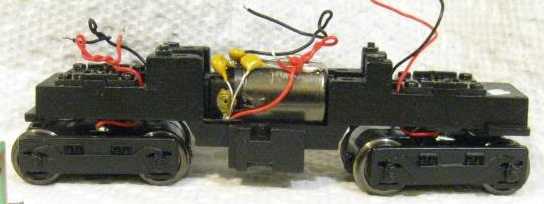
What is DCC Ready? A DCC ready locomotive is one that has the wiring from the wheel pickups, motor and the lights terminating at a socket, in the case of HO — 8 pin, N — 6 pin and O — 2 times 4 pin sockets. The loco will run on DC due to a jumper plug being inserted from the factory to connect applicable sockets to the motor and the lights. When the loco is to be operated on a DCC layout, it is as easy as removing the body shell, removing jumper plug and inserting the decoder plug, no soldering. This set up removes all the hassles of soldering all decoder wires to the relevant points and thus saves time and any one can do it even with no DCC or soldering experience. If the loco runs but lights do not work, then reverse the orientation of the decoder plug. No damage will be done to either decoder or loco if plug and socket are wired as per NMRA standard. Apart from a loco coming with "DCC equipped" with decoder, this is the next best thing. Any brand DCC decoder will enable motor and all functions to work correctly. Pin 1 is identified with a small triangle pointing to the pin. Specific decoders for certain locos will fit in perfectly and have correct current ratings for motor and lights. DCC Ready, as used by Bachmann in their G-scale locomotives, means something different. It simply means that it will be less work to install a decoder than if they had not made it "DCC Ready." But it still may be a lot of work. For an example of a Bachmann DCC Ready locomotive, consider the installation instructions for their external-frame Consolidation. If you are new to DCC and not confident of your wiring ability, you may not want to tackle a Bachmann as your first project. Bachmann provides no instructions other than "see the instructions for your decoder" — which are obviously generic. For specific instructions, see this and other websites. I have not worked on any other G-scale locomotives claiming to be DCC Ready to know how DCC Ready they are. I don't mean to scare you, okay, maybe a little bit, but not all locomotives that claim to be DCC-ready are. In fact, some are wired wrong and could damage your decoder. Okay, there is that scary thing again. The sad fact appears to be that model train manufacturers don't employ electrical engineers nor do they try out their "DCC-ready" locomotive with a DCC decoder before going into production and selling it to you. Sometimes it is as simple as no decoder will fit in the space provided. Worse, your decoder could be damaged. Do one of the following: Get on the appropriate chat group, such as the Wiring For DCC Q&A Forum, or the chat group of your locomotive's manufacturer and ask if anyone has put a decoder in your locomotive. If you don't ask anyone for their story, the safest bet is to rip out whatever electronics the manufacturer has placed in the locomotive and wire in a decoder. Of course, you can always be brave and see if you can get a decoder that will fit and work in your locomotive. I can't quote you a percentage, but this will work in some locomotives. I have done this. Capacitors on Motors In general, if your locomotive has "EMI" capacitors across the motor, these should be removed if installing a decoder. Especially decoders utilizing "back EMF" won't work wtih these capacitors.
Even locomotives that are alledged to be DCC ready, if they have capacitors, you may have to remove them. Remember, many manufacturers don't test their DCC ready locos. You can try your locomotive with the capacitors, but if your decoder acts funny, stop and remove them. The capacitors are intended to reduce radio intereference. So if you remove them, you might have radio intereference with a TV, your cell phone, or your wireless throttles. But I think the chances of that happening are unlikely. If you think you have intereference with a loco that has the capacitors removed, you will not have interference from a stationary locomotive or one that is removed from the track. If your throttle or whatever is still acting funny, your trouble is somewhere else.
How do I know if a locomotive already has a decoder in it? Installed decoder: When purchasing a
loco with a decoder installed, the dealer or an advertisement may say
the loco is "DCC equipped" or "Factory installed decoder"
or "W/DCC" or something along the lines but NOT "DCC
Ready".
What are speed steps? To operate the motor in the loco, the decoder has to provide a varying voltage from min to max value. In 14 speed steps there are only 14 different values of voltage, 28 has 28 values and 128 has 128 values. These values are called speed steps. Depending on the type of decoder some speed steps can be adjusted to modify a linear speed curve. Options on some decoders for speed step adjustment (speed tables) can be volts Start, volts Mid and volts Max, internal user selectable speed tables, manual adjust of speed steps CV 67 - 94 for 28 speed steps and external computer adjustment to these CVs to adjust motor performance, to enhance loco especially slow speed operation and to match different mechanisms to have the same performance. 14 speed step decoders are basic early units and may cause jerky motor operation.
How can I get good low speed control? Decoders have a few CVs that can be adjusted to fine tune the motor performance, especially better slow speed control. The basic adjustment of CV 2 is Volts Start. Adjusting this enables the loco to start moving at the first speed step. Adjusting CV 5 (volts max) will reduce maximum speed and adjusting CV 6 (volts medium) will now change the linear voltage table to non linear, that is reducing the value of CV 6 will give smaller increases in speed in the first half of throttle rotation, (flatter speed line). Later model decoders have the added feature of dither, torque compensation or back EMF (manufacturers names) to further improve slow speed control, by modifying the pulses of current to the motor to overcome inertia and mechanism friction. Some decoders have selectable speed tables that have their speed steps in such a manner to alter the linear speed table to have more or less throttle travel at low or high speeds, refer decoder instruction manuals. When a speed table has small increments at the low end and larger increments at the high end, this makes for better low speed control. Speed tables can also be manually loaded or the use of a computer with a program like Decoder Pro connected to the command station. The use of speed tables and CV2, CV5 and CV6 enables you to speed match locos to perform the same, irrespective of the mechanism. Some sound decoders do not support CV5 and CV6.
I don't intend to have many locomotives. Why might I want long addressing? It's not a matter of how many locos you have. Long (4
digit) addressing is used so that users can address their locos by it's
road number. If you had a loco with a road number of 5305, using the
short (2 digit) address you have to
What is "Back EMF" and Speed Stabilization? Back EMF (electromotive force) is a feedback method used
by some decoder manufacturers to provide a constant speed of the loco
irrespective of grade of the track or load without adjusting throttle.
This is a form of "cruise control" for locos.
How many trains can a throttle control?
Which decoder is right for my locomotive? The Wiring For DCC Q&A Forum gets this question a lot. But we can rarely provide an answer. Given all the locomotives out there and decoders that are available, it is unlikely that one of us has installed a specific decoder into the same locomotive you have. New models of decoders come out all the time. So what do you do? Luckily, there are easy solutions. 1. Visit your local train store. Make sure you take your locomotive with you. One of the key things is to make sure the selected decoder will fit. 2. Call stores that specialize in DCC equipment. They carry decoders from several manufacturers and they know what the current models of decoders are. They sell decoders all the time. They may indeed know which decoder is best for your particular locomotive. You might as well contact your favorite store and ask them which decoder is best for you. Right after they answer your question, the next thing you will want to do it buy it! So even if we knew which decoder is right for you, you will need to contact your favorite store anyway. Selecting a decoder is fairly easy. The main thing is to find a decoder that fits in your locomotive. If your locomotive has a decoder socket, as many newer models do, you will want a decoder with a plug on it. Make sure the decoder has the features you want. Unless you buy a budget-minded decoder, most decoders will have the features you need like four-digit addressing. There are many features a decoder can have. I could describe them here, but that may not help you in determining what you need. You may not know what you need or want. To make things simple, don't buy a budget-minded decoder and buy one that fits with a plug on it if you need it. As you learn about what features are desirable, a non-budget-minded decoder will likely have what you need. One more thing. Many locomotives, particularly diesels, have decoders made just for your particular model. Diesels are tight for space so DCC manufacturers are providing decoders just for the particular model you have. Check your favorite DCC manufacturer's website and see if they have a decoder just for you.
Do you have a beginner question not covered above? Ask it on the Wiring For DCC Q&A Forum.
|
|
Copyright by Allan Gartner 1996-2024 © All rights reserved. You may print this for your own, personal, non-commercial use. Non-commercial, non-personal reproduction may be requested by visiting www.WiringForDCC.com/writeme.htm . All users, commercial and non-commercial, may link only to this site at www.WiringForDCC.com. Thanks to all who contribute to this site and the Q&A forum! |

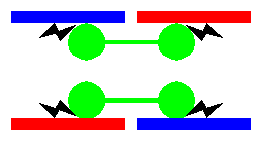
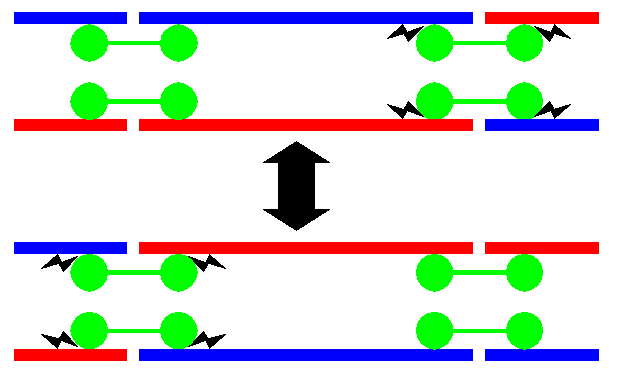

 So you may want to use turnouts that can be power routed later. Power
routed frogs are generally called live frogs. Peco calls their live
frog turnout an Electrofrog.
So you may want to use turnouts that can be power routed later. Power
routed frogs are generally called live frogs. Peco calls their live
frog turnout an Electrofrog.